
BubbleUPnP UPnP/DLNA License
Music & AudioPremium UPnP audio video streamer for home network.
Rating
4.1
Installs
500,000+
Price
$5.99
Screenshots
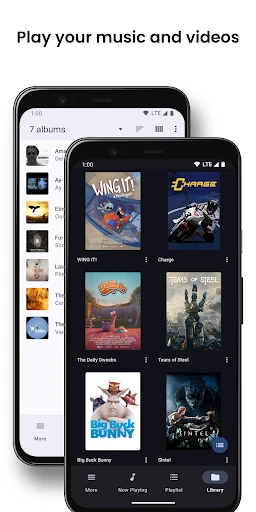
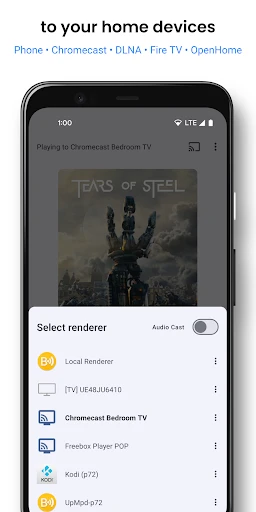
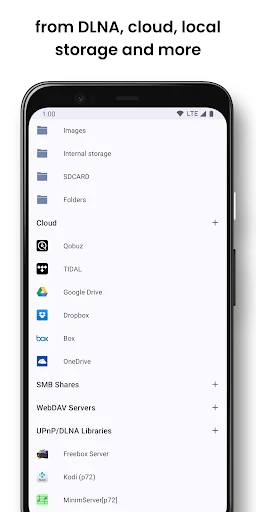
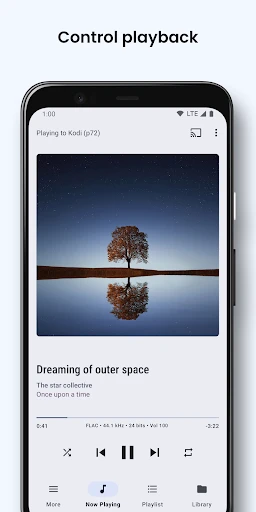
BubbleUPnP UPnP/DLNA: Your Home Media Streaming Buddy
Hey there! Have you ever wished you could stream all your media files to any device around your home without a hitch? Well, let me introduce you to BubbleUPnP UPnP/DLNA, an app that’s been a game-changer for me when it comes to managing and streaming my media collection. If you're like me and love having your music, movies, and photos available on any screen, this app might just be your new best friend.
So, What Exactly Is This App?
First things first, let’s talk about what BubbleUPnP UPnP/DLNA actually is. Essentially, it's an app that lets you stream all your media to different devices in your home using UPnP and DLNA protocols. Whether it's your smart TV, gaming console, or a wireless speaker, this app can send your favorite tunes or videos to any compatible device. It’s perfect for those lazy Sunday afternoons when you just want to chill on the couch and watch something on the big screen.
Getting Your Media Hub Up and Running
Getting started with BubbleUPnP is a breeze. After downloading and installing the app, which is available for both Android and iOS, you simply connect it to your home network. The interface is pretty intuitive, so even if you're not super tech-savvy, you’ll find your way around it pretty quickly. Once it’s up and running, you can access all your media files stored on your phone, NAS, cloud storage, or even online music services.
I found the setup process to be straightforward. Just ensure all your devices are connected to the same Wi-Fi network, and you’re good to go. It automatically detects compatible devices, and before you know it, you’re streaming like a pro.
Handy Features You'll Love
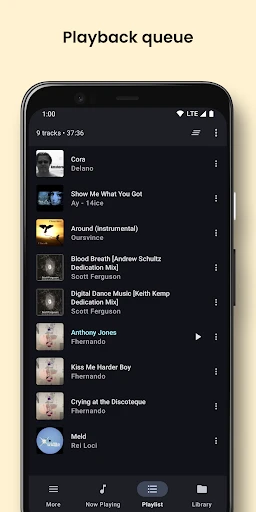
One of my favorite features is the ability to create playlists and control playback from my phone. If you’re someone who loves hosting parties or just enjoys having background music, this feature is a lifesaver. You can queue up songs, adjust volume, and even shuffle or repeat tracks without having to leave your seat.
Another cool thing is the ability to stream from cloud services like Google Drive or Dropbox. I often store my media files online, and being able to access them directly from the app is incredibly convenient. Plus, if you’re a fan of high-quality audio, the app supports various audio codecs, so you won’t miss out on sound quality.
Playing Nice With All Your Gadgets
BubbleUPnP works well with a wide range of devices. Whether you have a Chromecast, DLNA TVs, or HiFi systems, the app ensures smooth integration. During my time using it, I didn’t experience any lag or buffering issues, which is a big plus in my book. It’s also worth noting that the app supports subtitles for videos, which is great if you’re watching foreign films or shows.
For those who are concerned about security, the app allows you to password protect your media servers, giving you peace of mind knowing that your media is safe from prying eyes.
Wrapping It Up
Overall, BubbleUPnP UPnP/DLNA has been a fantastic addition to my app collection. It’s reliable, easy to use, and packed with features that cater to media enthusiasts like myself. Whether you’re streaming music to your living room speaker or watching a movie on your bedroom TV, this app makes it all possible without any fuss. So, if you’re looking for a way to amplify your home entertainment setup, give BubbleUPnP a try. It might just be the solution you’ve been searching for
Pros
- • Supports a wide range of media formats.
- • Easy setup with a user-friendly interface.
- • Seamless streaming to multiple devices.
- • Integrates well with cloud services.
- • Offers advanced transcoding features.
Cons
- • Limited free version functionality.
- • Occasional connectivity issues.
- • Interface may seem outdated.
- • Requires stable internet connection.
- • Subscription can be expensive.
FAQ
What is BubbleUPnP UPnP/DLNA License used for?
BubbleUPnP UPnP/DLNA License is used to unlock the full potential of the BubbleUPnP app, which is designed for streaming and casting media across various devices. With this license, you can enjoy an ad-free experience, access premium features, and enhance the app’s capabilities to stream content seamlessly over your home network or remotely.
How do I purchase the BubbleUPnP UPnP/DLNA License?
To purchase the BubbleUPnP UPnP/DLNA License, you need to download the BubbleUPnP app on your Android device from the Google Play Store. Within the app, you can navigate to the purchase section to buy the license. Follow the on-screen instructions to complete the transaction securely using your preferred payment method.
Do I need the BubbleUPnP UPnP/DLNA License for basic streaming?
No, the BubbleUPnP UPnP/DLNA License is not required for basic streaming and casting functionalities. The app itself can perform essential media streaming tasks without the license. However, purchasing the license enables additional premium features, such as removing ads, transcoding media for better compatibility, and enhanced remote access.
Can I use the BubbleUPnP License on multiple devices?
Yes, the BubbleUPnP UPnP/DLNA License can be used on multiple devices, provided they are linked to the same Google account used for the purchase. This allows users to enjoy the premium features on all compatible Android devices without needing to buy separate licenses for each device.
What should I do if my license isn’t recognized by the app?
If your BubbleUPnP UPnP/DLNA License isn’t recognized, first ensure that you are logged into the Google account that purchased the license. Check for any app updates that might resolve compatibility issues. If the problem persists, contact the app’s support team for further assistance. They can help troubleshoot and rectify any licensing issues you encounter.