Frame Crop - Samsung Frame TV
PhotographySamsung Frame TV Art Gallery Customizer.
Rating
5.0
Installs
500+
Price
$6.99
Screenshots
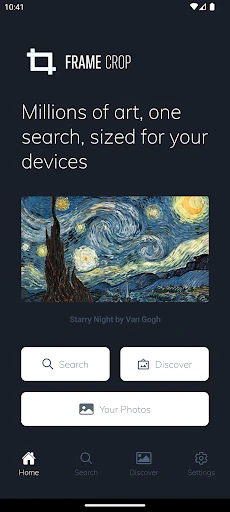
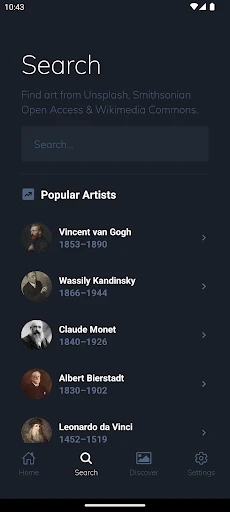
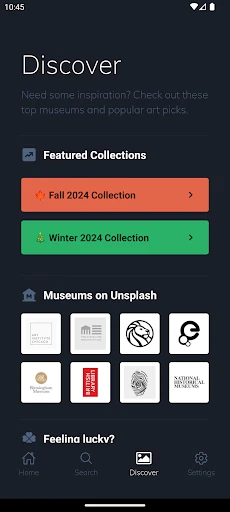
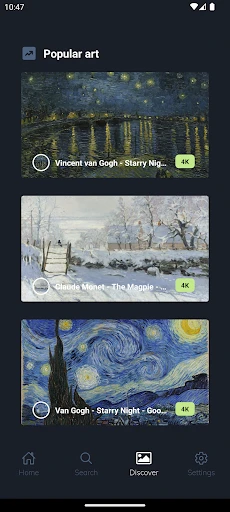
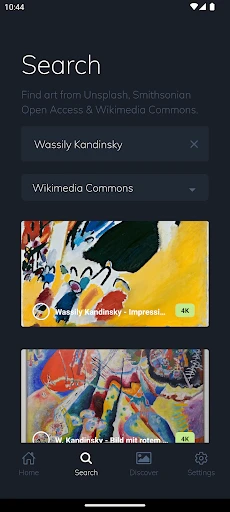
Turn Your Samsung Frame TV into a Personalized Art Gallery with Frame Crop
Getting the App Up and Running
First things first, getting the Frame Crop app on your phone is super simple. You can find it on both the Google Play Store and the Apple App Store. Once it's installed, you'll find the layout is really clean and easy to understand. You definitely don't need to be a tech expert to figure it out, which I think is a big win.
Features That Really Shine
One of the best things about Frame Crop is how it lets you custom-cut your pictures to fit the screen of your Samsung Frame TV perfectly. This means you can say goodbye to weird blank spaces or images that look stretched out. The app gives you several different cropping options so you can position your photo just right. It also comes with a bunch of filters to make your images pop, which is great if you like adding a creative touch.
Another really handy feature is how it connects to your cloud accounts. You can pull in pictures directly from places like Google Photos or Dropbox, or just use the ones in your phone's camera roll. This makes it incredibly easy to get to all your favorite photos without having to move files around yourself. Plus, the app handles high-quality images well, so your pictures will still look sharp and detailed on your TV.
What I Thought After Using It
After spending some time with Frame Crop, I can confidently say it's a fantastic tool for anyone with a Samsung Frame TV. It does an amazing job of letting you customize what's on your screen without any fuss. I was especially impressed with the cropping tool because it gave me total control over how my pictures were framed.
I did notice one small thing, though. Sometimes the app would slow down a bit when I was loading really high-quality pictures. It wasn't a major problem, but it's something to be aware of if you get easily frustrated with tech. I'm sure this little bug will probably be fixed in a future update.
Wrapping It All Up
All in all, Frame Crop is an essential app if you want to get the most out of your Samsung Frame TV. It's easy to use, has lots of useful features, and makes showing off your photos a real joy. Whether you're into art or just love having your family pictures on display, this app is absolutely worth a look.
So, if you're excited to make your TV look like a custom art piece, you should definitely try Frame Crop. It could easily become your new go-to app
Pros
- • Intuitive user interface for easy navigation.
- • High-quality image editing tools.
- • Seamless integration with Samsung Frame TV.
- • Supports multiple photo formats.
- • Fast processing speed.
Cons
- • Limited free features; premium needed.
- • Occasional bugs in the app.
- • Requires Samsung Frame TV for full use.
- • No cloud storage integration.
- • In-app purchases can be costly.
FAQ
What is Frame Crop - Samsung Frame TV and how does it work?
Frame Crop - Samsung Frame TV is a versatile app designed to optimize your viewing experience by allowing you to crop and adjust images to fit perfectly on your Samsung Frame TV. The app provides intuitive tools to resize and position your images, ensuring they look stunning as part of your home decor. It is user-friendly and requires minimal setup, making it accessible even for those who aren't tech-savvy.
Is Frame Crop - Samsung Frame TV compatible with all models of Samsung Frame TVs?
Frame Crop is specifically designed for Samsung Frame TV models, but compatibility may vary depending on the model and software version of your TV. It is recommended to check the app's compatibility details on the download page or the manufacturer's website to ensure it will work seamlessly with your specific TV model.
Are there any costs associated with using Frame Crop - Samsung Frame TV?
Frame Crop - Samsung Frame TV is available as a free download, but it may offer in-app purchases for additional features or tools. These premium features could include advanced editing tools, additional templates, or exclusive content for optimizing your TV's display. Users can choose to use the free version or enhance their experience with optional paid features.
What are the main features of Frame Crop - Samsung Frame TV?
The main features of Frame Crop include easy-to-use cropping tools, the ability to adjust the aspect ratio, and a wide selection of templates to fit your Samsung Frame TV perfectly. Additionally, the app offers photo editing capabilities like brightness and contrast adjustments, ensuring your images look their best when displayed. It also supports multiple image formats to provide flexibility for users.
Do I need an internet connection to use Frame Crop - Samsung Frame TV?
An internet connection is required initially to download Frame Crop - Samsung Frame TV and for accessing updates or additional content. However, once installed, the app can function without an internet connection, allowing you to crop and adjust images offline. This offline capability ensures continuous usage without relying on internet availability.