
Nano Teleprompter
ProductivityProfessional Teleprompter For Confident Video Recording.
Rating
4.6
Installs
50,000+
Price
$4.49
Screenshots
Nano Teleprompter
When it comes to making videos or giving a talk, a good teleprompter app can totally change the game. That's the role Nano Teleprompter aims to fill. From my own experience with video projects, I can say this app is a clever little helper that can seriously boost your content creation.
Getting to Know Nano Teleprompter
First off, let's introduce Nano Teleprompter. This app is built for both beginners and pros who want a straightforward way to read a script while they film. Whether you're a YouTuber, someone who gives talks, or just need to rehearse some lines, Nano Teleprompter is there for you.
Handy Features That Stand Out
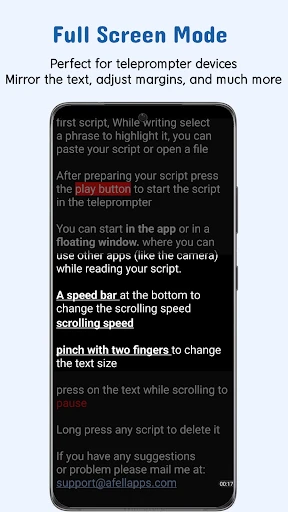
The app is packed with options, but a couple are real winners. Being able to change the scrolling speed is a huge help. You can set it to a comfortable pace so you can read smoothly without tripping over your words. It also has a mirroring feature, which is ideal if you're working with a reflective screen.
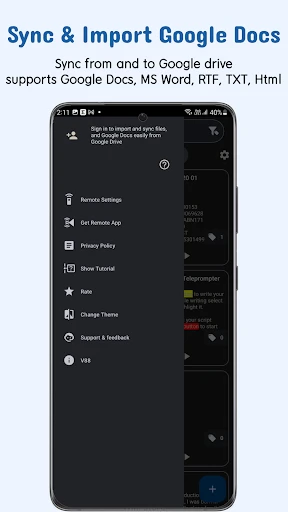
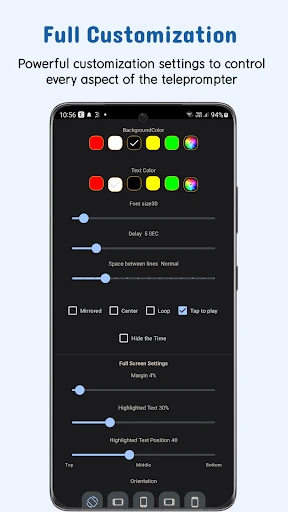
Another cool aspect is how you can bring in scripts from places like Google Drive or Dropbox. This saves you from the annoying task of copying and pasting text between different apps. On top of that, you can change the text size and color, so you can adjust the screen to exactly what works for you.
How to Use the App
Getting it set up is a total breeze. After you download and install the app, you're met with a simple layout that's easy to figure out, even if you're not great with tech. It's practically ready to go right away.
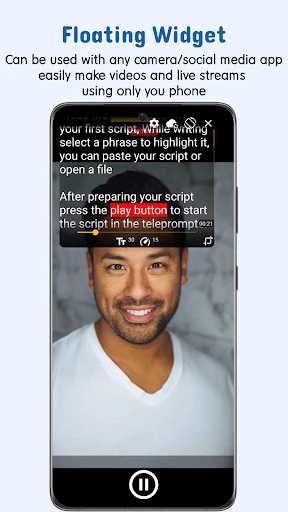
Just import your script and place the floating window wherever you want on your screen. The see-through background lets you view your lines while still using your camera or another app. This is super useful when you're filming yourself with your phone.
How It Holds Up in Practice
I used Nano Teleprompter for a recent video tutorial, and it was a big help. I had a long script to get through without memorizing it all. This app made it simple. I could set the scroll speed so I didn't have to talk too fast, and the floating window worked perfectly with my camera app.
What really stood out was how reliable it was. It didn't freeze or stutter once during my recording session, which is more than I can say for some other apps I've tried. It felt like having a professional teleprompter setup right on my phone.
Wrapping Up
In the end, Nano Teleprompter is a great pick for anyone who wants to improve their videos or practice speaking without spending a lot on professional gear. Its easy-to-use design and powerful features make it an app that's definitely worth checking out.
If you're getting into making videos or just need a dependable tool for your speeches, you should test out Nano Teleprompter. It's like having a tiny coach in your pocket, always ready to help you speak with more confidence and poise.
Pros
- • Lightweight and easy to use interface.
- • Customizable text size and scrolling speed.
- • Compatible with various video recording apps.
- • No intrusive ads to disrupt your workflow.
- • Supports script import from multiple sources.
Cons
- • Limited free version features.
- • Occasional syncing issues with scripts.
- • No cloud save for scripts.
- • Some features require in-app purchases.
- • Can drain battery quickly during use.
FAQ
What is Nano Teleprompter and how does it work?
Nano Teleprompter is a mobile application designed to assist content creators, speakers, and video producers by providing a scrolling text display that overlays on your device’s camera. It allows users to read scripts smoothly while maintaining eye contact with the camera, enhancing the quality and professionalism of your video recordings. The app integrates seamlessly with your device and can be customized with different text speeds, sizes, and colors to suit your preferences.
Is Nano Teleprompter compatible with all devices?
Nano Teleprompter is available for both Android and iOS devices, supporting a wide range of smartphones and tablets. However, compatibility may vary based on the device's operating system version and technical specifications. It is advisable to check the app’s requirements on the respective app store before downloading to ensure it works smoothly on your device. Regular updates are provided to expand compatibility and add new features.
Can I import scripts from other applications into Nano Teleprompter?
Yes, Nano Teleprompter allows users to import scripts from various file formats, including text and document files. It supports integration with cloud storage services such as Google Drive and Dropbox, making it easy to access and import your scripts directly into the app. This feature ensures that you can quickly prepare for your presentations or recordings without the hassle of manually entering text.
What customization options does Nano Teleprompter offer?
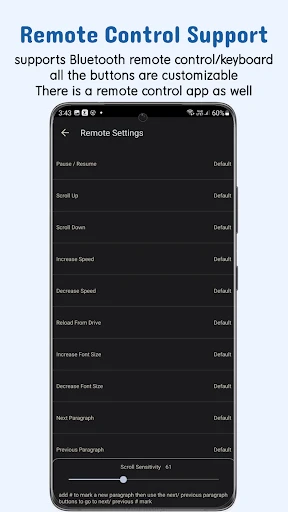
Nano Teleprompter offers extensive customization features to enhance user experience. You can adjust the scrolling speed, text size, and color to match your presentation style. Additionally, the app supports mirror mode for use with professional teleprompter rigs, and users can control the script using Bluetooth devices or on-screen gestures. These options provide flexibility for various recording environments and user preferences.
Is there a cost associated with using Nano Teleprompter?
Nano Teleprompter offers both free and premium versions. The free version provides basic functionality with limited features, while the premium version unlocks advanced features such as unlimited script lengths, additional customization options, and ad-free usage. The premium version is available through a subscription or a one-time purchase, offering flexibility depending on your usage needs and budget.