
Cast to TV+ Chromecast Roku TV
Video Players & EditorsCast Screen Videos Music To Television.
Rating
4.6
Installs
10,000,000+
Price
Free
Screenshots
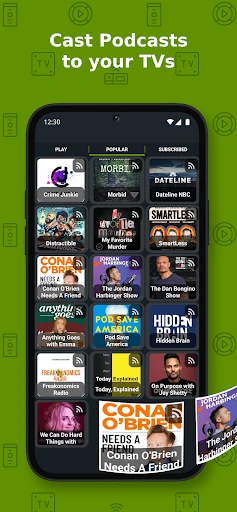
Cast to TV+ Chromecast Roku TV: A User's Hands-On Experience
Have you ever had those moments when you’re trying to share a video, photo, or some music on your phone with your friends, but everyone has to shuffle around a tiny screen to watch? Well, say goodbye to those awkward gatherings and hello to "Cast to TV+ Chromecast Roku TV." This handy app makes sharing media on larger screens a breeze, and I’ve given it a whirl to see just how well it performs.
Getting Your Screen Sharing Started
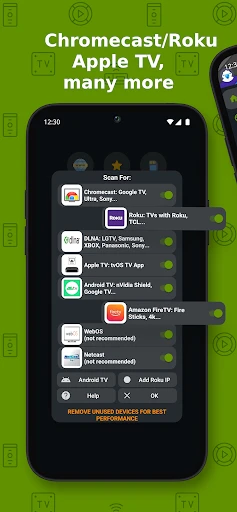
First things first, setting up Cast to TV is surprisingly straightforward. As soon as you launch the app, it prompts you to connect to your TV. Whether you’re using a Chromecast or a Roku, the app seamlessly finds your device and hooks right up. You don’t need to be a tech wizard to get this going, and that’s a huge plus in my book. With just a couple of taps, you’re ready to start casting.
Handy Tools for Everyday Use
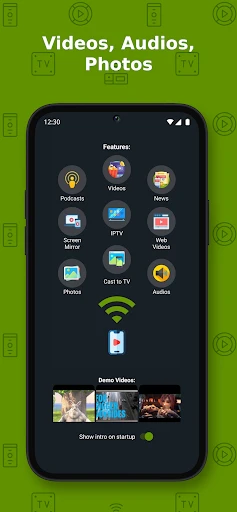
One of the features that immediately caught my eye is the app’s versatility. It supports a wide range of media formats, which means you won’t be stuck converting files just to play them on your TV. I tested out some MP4 videos, a few JPEG images, and even a handful of MP3s, and everything played smoothly without a hitch.
Another neat feature is its ability to cast web videos. I found this especially useful when browsing through online content. You can just copy the URL of the video you want to watch and paste it into the app, and voilà, it’s on your TV screen. It’s perfect for streaming those late-night YouTube sessions or catching up on the latest viral videos with friends.
Navigating the App with Ease
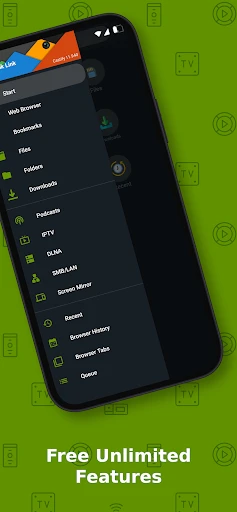
The app’s interface is clean and intuitive, which I absolutely love. All the controls are where you’d expect them to be, and the design is sleek without being overly complicated. There’s a certain charm to apps that keep things simple, and Cast to TV nails it in this department. Plus, it didn’t lag or crash during my testing, which is always a big win.
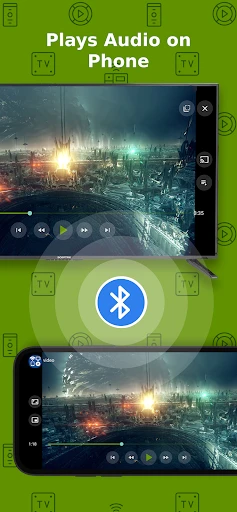
It also offers some handy playback controls. You can pause, play, and even adjust the volume right from your phone, which means you don’t have to keep reaching for the remote. It's little touches like these that enhance the overall user experience.
Considering the Downsides
Now, while Cast to TV is a solid performer, it’s not without its quirks. For instance, there were a couple of times when the connection dropped unexpectedly. It’s a minor hiccup, but it can be annoying, especially if you’re in the middle of an intense movie scene. However, reconnecting is usually just a matter of opening the app again and hitting the connect button, so it’s not a deal-breaker.
Also, while the app is free to use, there are some ads. They’re not overly intrusive, but they do pop up every now and then. If you’re like me and tend to get a bit impatient with ads, you might find this a tad frustrating.
Overall, Cast to TV+ Chromecast Roku TV is a nifty little app that delivers on its promise of making media casting simple and accessible. It’s perfect for those casual gatherings where you want to share a laugh or two with friends without the hassle of complicated setups.
Pros
- • Easy setup with various TV devices.
- • Supports multiple media formats.
- • User-friendly interface.
- • Streams in high quality without lags.
- • Compatible with popular streaming services.
Cons
- • May require in-app purchases.
- • Occasional connectivity issues.
- • Ads in the free version.
- • Limited support for older TV models.
- • Requires a stable Wi-Fi connection.
FAQ
What is Cast to TV+ Chromecast Roku TV and how does it work?
Cast to TV+ Chromecast Roku TV is a versatile application that allows users to stream media content from their mobile devices to smart TVs and streaming devices like Chromecast and Roku. By connecting your device and TV to the same Wi-Fi network, you can easily mirror your device’s screen or cast videos, photos, and music to the larger display. The app supports a wide range of media formats and is designed to offer a seamless streaming experience.
Is Cast to TV+ Chromecast Roku TV compatible with all types of smart TVs?
While Cast to TV+ Chromecast Roku TV is compatible with many smart TVs, including those equipped with Chromecast and Roku, it is important to check if your specific TV model supports this app. Generally, most newer smart TVs are compatible, but you should verify the compatibility with your TV’s specifications or manufacturer’s website before downloading the app to ensure it will work with your setup.
Does Cast to TV+ Chromecast Roku TV require an internet connection to function?
Yes, an internet connection is required for Cast to TV+ Chromecast Roku TV to function properly. Both your smartphone or tablet and your smart TV or streaming device need to be connected to the same Wi-Fi network. This connection ensures that the app can effectively communicate between your device and the TV, allowing you to cast or mirror content seamlessly.
Are there any subscription fees or in-app purchases in Cast to TV+ Chromecast Roku TV?
Cast to TV+ Chromecast Roku TV may offer a free version with basic features, but it often includes in-app purchases or subscription options to unlock advanced functionalities, such as removing advertisements, accessing premium features, or enhancing streaming quality. It is advisable to review the app’s pricing model before downloading to understand any potential costs associated with using the app to its full extent.
What types of media files can be cast using Cast to TV+ Chromecast Roku TV?
Cast to TV+ Chromecast Roku TV supports a wide variety of media file types, allowing you to cast videos, music, and photos from your mobile device to your TV. Commonly supported formats include MP4, MKV, MP3, JPEG, and more. However, it's recommended to check the app's specifications to ensure compatibility with the specific file formats you intend to use, maximizing your streaming experience.